How DNS Resolution Works

How does the internet know where a website lives?
Imagine this.
You open your browser and type:
google.com
Within seconds, Google loads.
But pause for a moment and think — how did your computer know where Google actually is?
Your browser does not understand words like:
Computers don’t speak names.
They only speak numbers.
What your computer actually needs is something like:
142.250.67.46
That number is the real address of Google on the internet.
So the real question is:
How does a human-friendly name turn into a machine-friendly number?
That job is handled by DNS.
What is DNS and why does name resolution exist?
DNS stands for Domain Name System.
In very simple terms:
DNS is the phonebook of the internet.
Humans remember names →
google.comComputers need addresses →
142.250.67.46
DNS connects the two.
This conversion from name → address is called name resolution.
Why not just remember IP addresses?
Because that would be painful.
There are billions of websites
IP addresses change
Servers move to new locations
New websites appear every day
No human wants to remember numbers for everything.
So DNS exists to:
keep things human-friendly
allow servers to change without breaking the internet
distribute responsibility instead of one giant database
DNS is hierarchical
DNS is not one big server that knows everything.
Instead, it works like asking for directions step by step.
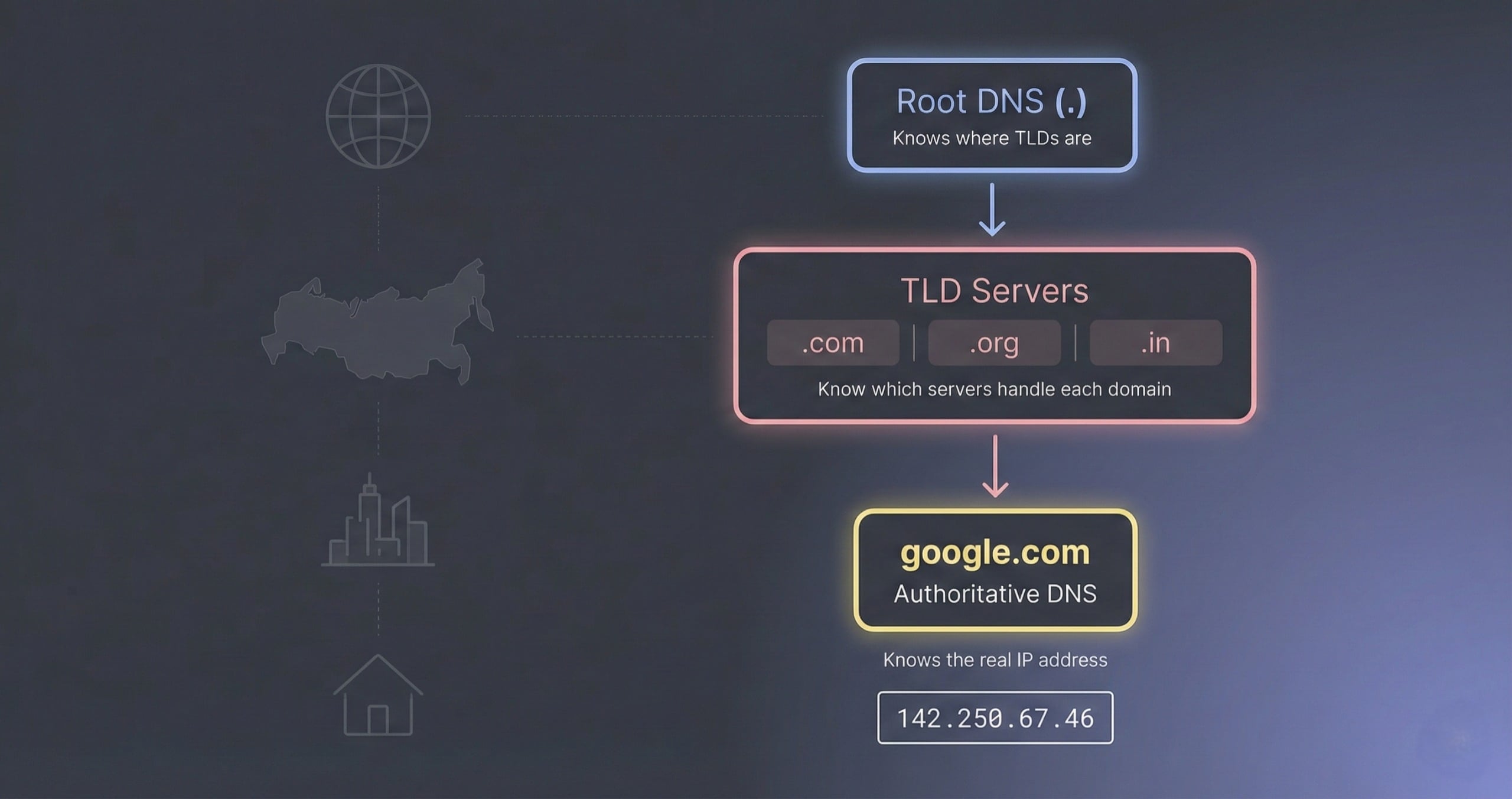
Root servers
   ↓
TLD servers (.com, .org, .in)
   ↓
Authoritative servers (google.com)
Each level knows only enough to point you to the next level.
Real-life example
Think of finding a house:
Ask the world map → which country?
Ask the country map → which city?
Ask the city office → which street?
Get the house address
DNS works the same way.
Where does dig come into the picture?
Normally, all of this happens silently.
Your operating system:
talks to a DNS resolver
caches results
hides the details
As a developer, that feels like magic — and magic is bad for debugging.
This is where dig helps.
What is the dig command?
dig stands for Domain Information Groper.
Sounds fancy, but it’s simple.
diglets you ask DNS questions directly and see the answers.
You can use it to:
see which servers are involved
understand DNS layers
debug “site not loading” issues
Think of it as:
curl for DNS
DNS resolution happens in layers
Before running any commands, lock this idea in your head:
DNS resolution is a journey, not a single step.
Let’s walk that journey one step at a time using dig.
Step 1: Asking the root — dig . NS
dig . NS
What does this mean?
.means the DNS rootNSmeans Name Servers
So this command asks:
“Who are the name servers at the very top of DNS?”
What are root name servers?
Root servers:
sit at the top of DNS
don’t know IPs of websites
only know who manages each top-level domain
They answer questions like:
Who handles
.com?Who handles
.in?
Output (simplified)
You’ll see names like:
a.root-servers.net
b.root-servers.net
c.root-servers.net
...
Important thing to know:
There are 13 logical root servers
Each one has many copies worldwide
Root servers never answer:
“What is google.com’s IP?”
They only say:
“For
.com, talk to these servers.”
Step 2: Asking about .com — dig com NS
dig com NS
What is a TLD?
TLD means Top Level Domain.
Examples:
.com.org.in.net
This command asks:
“Who is responsible for all
.comdomains?”
Output (simplified)
You’ll see servers like:
a.gtld-servers.net
b.gtld-servers.net
...
These are TLD name servers.
Why does this layer exist?
Without TLD servers:
root servers would be overloaded
DNS wouldn’t scale
So responsibility is split:
Root → knows TLD servers
TLD → knows authoritative servers
Authoritative → knows actual IPs
Important detail:
TLD servers do not know Google’s IP
They only know who is allowed to answer for google.com
Step 3: Asking about google.com — dig google.com NS
dig google.com NS
Now we ask:
“Who is the official source of DNS information for google.com?”
Output (simplified)
You’ll see something like:
ns1.google.com
ns2.google.com
ns3.google.com
ns4.google.com
These are authoritative name servers.
What does “authoritative” mean?
Authoritative servers:
store the real DNS records
give final answers
are the source of truth
If these servers say:
google.com → 142.250.67.46
That’s the answer everyone trusts.
Why NS records matter
NS records tell the internet:
“These servers are allowed to answer for this domain.”
Without correct NS records:
domains won’t resolve
websites won’t load
emails may fail
NS records are like ownership papers.
Step 4: Getting the IP — dig google.com
dig google.com
This is what your browser does behind the scenes.
What happens internally?
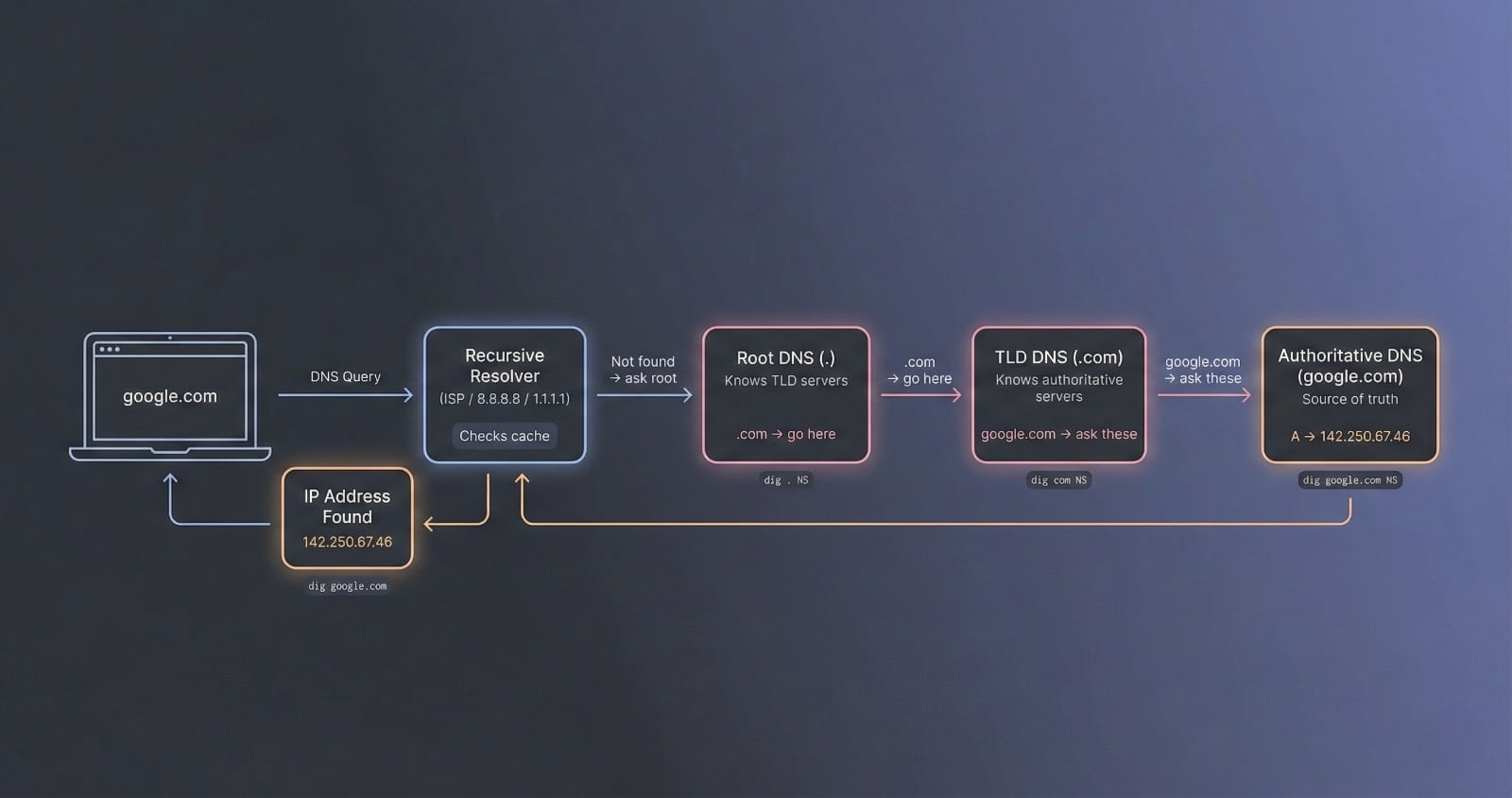
Even though you typed one command, the resolver does this:
Check cache
Ask root servers
Ask
.comTLD serversAsk Google’s authoritative servers
Store the result
Return IP to you
Output (simplified)
google.com. A 142.250.67.46
This means:
Domain: google.com
Record type: A
IP address: 142.250.67.46
Now your browser knows:
“Send requests to this IP.”
How recursive resolvers fit in
Your laptop does not talk to root servers directly every time.
Instead, it talks to a recursive resolver, usually run by:
your ISP
Google DNS (8.8.8.8)
Cloudflare (1.1.1.1)
The resolver:
walks the full DNS path
caches results
makes future lookups fast
That’s why:
first visit may be slower
later visits are fast
Mapping dig commands to real DNS steps
| dig command | What it shows |
dig . NS | Root servers |
dig com NS | TLD servers |
dig google.com NS | Authoritative servers |
dig google.com | Final IP |
Each command reveals one layer of the journey.
How this connects to real browser requests
When you type:
https://google.com
Your browser does:
DNS lookup → get IP
TCP connection
TLS handshake
HTTP request
Render page
DNS is step zero.
If DNS breaks:
websites fail
APIs fail
email fails
That’s why DNS is considered critical internet infrastructure.
Final mental model
Think of DNS like asking for directions:
Ask the world map (root)
Ask the country map (TLD)
Ask the city office (authoritative)
Get the house address (IP)
And dig lets you watch that conversation happen.
Once this clicks:
DNS stops feeling magical
networking feels logical
backend systems make more sense